
Registration for any event can be complicated. From creating the registration process to ensuring that all attendee sign-ups are gathered and processed accurately, even the basics can be burdensome - particularly when it's for a large event with hundreds or even thousands of attendees.
One way that event organizers can simplify the entire process is to use automated registration software. To help you create and manage a smooth automated registration process for your event, Regpack has put together this handy guide.
- Why Is Automated Registration Important?
- Registration Best Practices for Attendee Satisfaction
- Must-Have Registration Features
- Common Registration Challenges for Your Business and How to Solve Them
- Creating a Seamless Registration Process for Your Large Event
Why Is Automated Registration Important?
The more people who sign up for an event, the more vital automated registration becomes. Compared to a manual process, automated registration can lead to a better attendee experience while saving your business both time and money.
Attendee Expectations
Your registration process will likely be one of the earliest points of contact the attendee has with your event, if not the very first. They'll expect it to be easy and seamless.
Automated registration helps you meet this expectation. Instead of communicating with an agent or visiting the business premises in person, automated registration is instant, easy, and convenient. Plus, in this digital era, most registrations can be completed online. If your attendees can only register for your event by contacting your team, it can portray you as old-fashioned.
Reduced Manual Work
Manually registering someone for an event involves taking down all of their details before processing the registration, which is far from efficient.
Automated registration eliminates the need for your team to manually register attendees. For large events, this can save you dozens of man-hours and hundreds or even thousands of dollars.
Less Human Error
From misplaced registration forms to inaccurate information collection, manual registration is highly prone to errors. Automated registration reduces this risk since all registrations are processed automatically, and the information is recorded exactly as the attendee provides it.
Useful Data Collection
Automated registration allows you to quickly receive additional information from your attendees. In some cases, this can help improve your knowledge of your attendees and more successfully deliver an event they will enjoy.
In other cases, your attendees may want an easy way to deliver additional information about themselves that they feel is important for you to know. This could be information on accessibility needs, a disability, or food allergies. This type of information will help you provide a safe and inclusive event for all your attendees.
You'll also want to be able to receive certain information automatically so you can improve your business operations, such as:
- Demographic information about attendees.
- What device attendees use to register.
- What time of day attendees register.
- How far in advance attendees register.
- The attendee's customer journey.
Integration to Other Aspects of Your Event
Registration is just one aspect of organizing your event, but it doesn't have to be an isolated process. Instead, you can use the registration process to inform and improve other aspects of your event.
Automated registration can make this easy. For example, if your event will provide food that needs to be ordered in advance, you could take down the attendees' meal choices when they register. Once registration is complete, each attendee's meal choices can automatically be forwarded to the relevant team. Without automated registration, your team would have to send this information over manually, which could result in delays or inaccurate information.
See your numbers
Get a personalized, no-commitment savings report.
Have a question?
Ask Regpack AI anything.
Registration Best Practices for Attendee Satisfaction
The following best practices can help ensure your registration process meets your attendees' expectations and delivers everything it should.
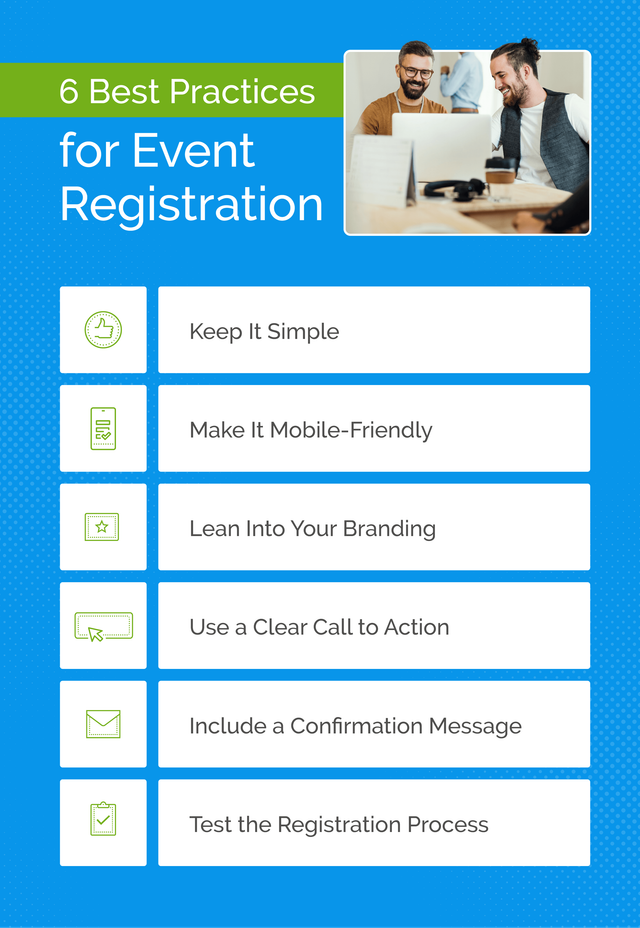
Keep It Simple
Registration shouldn't be an obstacle that people must overcome to attend your event. Instead, it should be as easy and efficient as possible. This means you should:
- Allow attendees to withhold non-vital information.
- Ask simple and easy-to-answer questions whenever possible.
- Use a layout that's intuitive and not too busy.
Make It Mobile-Friendly
Gone are the days when the bulk of our online activity took place on a desktop. Now, mobile devices account for nearly 63% of global website traffic.
So, it's no surprise that your attendees will expect to be able to register on their phone, which makes this an essential feature to provide.
Mobile-friendly registration can benefit you, too, as a mobile site is more accessible than one that is only desktop-friendly. This allows you to broaden your audience and increase the number of people who can register for your event.
Lean Into Your Branding
The registration process is a chance to make a stellar impression on your attendees, which is why your branding should be visible throughout the process. This will include using your brand colors, brand voice, logos, and anything else that is unique to you.
Beyond familiarizing your attendees with your brand, this also helps create a more seamless experience. For example, if the attendee has clicked from an email filled with your branding to a registration process that looks like it belongs to another business, it can be jarring. Inconsistent branding can also reduce brand recognition over time, which makes it difficult to establish your presence in the market.
Use a Clear Call to Action
Clarify what action your attendee will accomplish when they complete the registration process. Have they booked entry to your event? Or have they just reserved a spot to buy entry tickets at a later date? Or perhaps they've just signed up for email reminders to let them know when tickets are released.
A clear CTA can reduce the likelihood of miscommunication between you and your attendees.
Include a Confirmation Message
To provide further clarity for your attendees, it's always useful to have a confirmation message. This message can either be a pop-up that appears as soon as they've booked, or an email confirmation. The pop-up message is instant but temporary, while an email may take a few seconds to go through. However, an email confirmation can also remind the attendee of the event details in the future, and can be useful for them to refer back to closer to the event.
Test the Registration Process
Few things frustrate users more than services or products that don't work as they should, and event registration is no different. It can also create a poor impression of your business - if you can't even get a registration form right, how can they expect you to run a great event?
To reduce the risk of your registration process not performing as expected, you need to test every aspect and feature. You also need to ensure:
- The attendee is able to register and pay for the event.
- The copy is free from typos or grammatical errors.
- All information provided is accurate.
- Any confirmation messages are received promptly.
Must-Have Registration Features
In theory, registration should be a simple process. But when you start to dig into the details, you'll realize that there's plenty you need to consider when creating your registration process. Here are the key features you should include to keep your attendees happy.
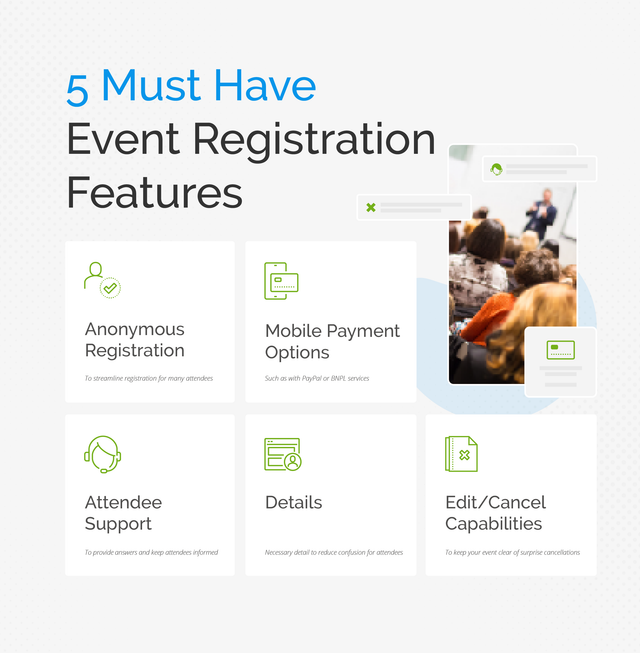
Anonymous Registration
While this might not be possible for all events, some attendees may wish to register for your event anonymously. Whenever this feature is possible for your event, you should always offer it. It allows attendees to register for your event without creating an account or providing personal details.
This anonymous process can streamline registration for many attendees.
Mobile Payment Options
To make the process more convenient, it's best to allow attendees to pay for any registration fees with mobile payment options such as Apple Pay. It's a feature that many attendees will expect to find when they register, as many other event registrations will offer it.
When you provide mobile payment options, you need to ensure your site is fully secure so that they can make their payments safely. You should also display security logos and make it clear what the total cost is, all of which will provide peace of mind for your attendees.
If possible, give your attendees multiple ways to make a mobile payment, such as with PayPal or Buy Now, Pay Later services.
Attendee Support
Some of your attendees will likely have questions about your event before they arrive. A dedicated support service can provide these answers and keep your attendees informed and happy. These answers could be delivered in the form of:
- An FAQ section that gives information on common queries.
- A chatbot that can provide simple answers and direct attendees to where they can find more detailed answers.
- A support team that can answer complicated or unique questions.
Details
It may be a basic feature, but if your registration doesn't provide the necessary details, it can confuse your attendees and leave basic questions unanswered. For some attendees, this will merely be an annoyance, but for many, it could turn them away from registering.
Some basic details to provide with any registration include:
- Date and time
- Location
- Cost
Depending on your event, you may wish to provide additional details, such as the timeline of events, guest speakers, or food options. The goal is to provide all the essential details your attendees will need, without giving too much away or overwhelming them with information.
Edit/Cancel Capabilities
Plans can change between registration and the event, and attendees will often need to alter their registration details. Make it easy for your attendees to add or remove people from their party, adjust the time of their arrival, or even cancel their attendance altogether. This improves the attendee experience and keeps your event clear of surprise cancellations or amendments.
Common Registration Challenges for Your Business and How to Solve Them
While you may create the perfect registration process for your attendees, that doesn't necessarily mean it's perfect for your business, too. Here are some common challenges you may face and how you can overcome them.
Lack of Reporting
Manual registration requires manual reports, which can be time-consuming. But reports on your event's sales, attendees' data, and other information points can massively boost every aspect of your event.
The best way to receive detailed and easily accessible reports on your automated registration is through software with built-in reporting tools.
Fixed Registration Forms
Every event is unique, as is the business that runs it. That's why fixed registration forms can feel restrictive and unsuited to your event. On the other hand, the ability to customize the registration process to better suit your event can be extremely useful.
Automated registration software that allows for customized forms can give you the freedom to create the perfect registration form. This customized form can provide the information you need to know specifically for your event.
Integration With Other Software
One of the benefits of automated registration is that it allows you to integrate your registration process with other aspects of your event. But this isn't always as easy as it could be. If the data from your registration software can't translate to another program, you may have to tediously reformat the data before uploading it to other software programs.
For the most seamless integration, make sure your chosen automation software uses application programming interfaces (APIs) to simplify data transfers from the registration phase.
Subscription Management
If your event is recurring, you may want to offer your attendees the option to subscribe. This makes it easier for them to register for future events and guarantees you have visitors signed up for future events.
To make this as easy as possible, your registration software should allow for subscriptions and recurring payments.
Creating a Seamless Registration Process for Your Large Event
A lot of work and consideration goes into creating a registration process that works for both your business and your event's attendees. But one of the best ways to design the perfect registration process for large events is to leverage automated registration software.
The ideal event registration and payment software will go beyond a smooth process for your attendees - it will also give your business the tools it needs to improve every aspect of your event through detailed reporting tools, seamless payment methods, and more.