
Organizations that continue to rely on outdated paper bills and manual invoicing processes are losing time and money. Switching to an electronic billing system offers an automated way to manage payments, track invoices, and improve cash flow.
What is an Electronic Billing System?
An electronic billing system (also called e-billing software) is a digital format solution for creating, sending, and managing bills or invoices electronically. Instead of using paper invoices or manual systems, businesses can send electronic invoices directly to their clients via email or other electronic channels.
The billing process becomes faster, more accurate, and more efficient. Electronic billing allows businesses to accept online payments through credit card, debit card, or other payment methods while reducing administrative work.
With e-billing software, you can:
- Generate invoices in seconds.
- Send bills to participants or clients using email notifications.
- Track payments in real time.
- Reduce errors caused by manual data entry.
How Does an Electronic Billing System Work?
An e-billing process automates your billing system from start to finish.
Here's how it works:
#1 Create an Invoice
- Generate an electronic bill using a customizable software system.
- Enter necessary file format details such as client contact information, due dates, and payment amounts.
#2 Send the Invoice
- Send the digital invoice to the client via email or secure bill delivery platforms.
- Clients receive an email notification with links to a secure website where they can make online payments.
#3 Receive and Process Payments
- Clients can pay with credit or debit cards or other payment methods.
- Payments are processed through a gateway provider or merchant service provider.
#4 Track Payments
- The system tracks the status of each sales transaction, whether it's paid, pending, or overdue.
- Generate reports to monitor cash flow and identify delays.
#5 Automate Follow-Ups
Set automated reminders to ensure payments are received in a timely manner.
Benefits of Using an Electronic Billing System
Switching to an electronic billing solution provides numerous benefits for organizations of all sizes.
Here's why businesses like event organizers, educational programs, and camps are making the switch:
- Saves Time and Reduces Administrative Work: Manual invoicing can take days to complete. An e-billing system automates tasks like generating electronic invoices, sending reminders, and processing payments. This frees up your team to focus on more important tasks.
- Improves Cash Flow Management: Delayed payments can cause significant cash flow issues. An electronic billing system ensures faster bill delivery and quick payment processing, improving your overall cash flow.
- Enhances Participant or Client Experience: With electronic payment options and instant billing, clients enjoy a smoother experience. Whether it's paying tuition for a class or submitting a membership fee, users can make payments quickly and securely.
- Reduces Errors and Improves Accuracy: Manual entry of paper invoices often results in errors. An e-billing software ensures accuracy by using standardized file formats and automated calculations.
- Secure and Compliant Payment Processing: Security is a top priority for businesses today. Reputable billing software ensures payments are made through secure electronic systems, protecting sensitive financial data.
Who Can Benefit the Most from Electronic Billing Systems?
Electronic billing systems are versatile and work for a variety of organizations, including:
Event Organizers
- Streamline ticket sales, registrations, and event payments.
- Use automated reminders to improve payment completion rates.
Camps and Recreation Programs
- Simplify payments for camp fees, sports leagues, and activities.
- Offer installment options with automated payment plans.
Educational Programs
- Automate tuition payments and track balances in real time.
- Reduce administrative work and focus on student services.
Nonprofits and Membership Organizations
- Collect donations, manage memberships, and track fundraising payments.
- Use legal billing tools to comply with donor regulations.
Law Firms and Legal Departments
- Implement legal e-billing to streamline invoicing and payments for outside counsel.
- Ensure payments are processed on time and improve cost recovery.
Common Concerns About Electronic Billing Systems
Some organizations hesitate to switch to an electronic billing solution due to misconceptions.
Let's address the most common concerns:
Is it difficult to set up?
Many assume electronic billing systems are complex to implement. However, most systems are designed to be intuitive and easy to set up, with guided workflows to simplify the transition.
Is it expensive?
While there may be upfront costs, electronic billing systems typically lead to long-term cost savings by reducing administrative time, printing costs, and errors.
Is my payment data secure?
Security is a common concern, but reputable systems use advanced encryption and compliance measures to protect payment and billing data.
What if I lose control of my billing process?
Electronic systems actually improve control by providing real-time tracking, automated reminders, and comprehensive reporting.
See your numbers
Get a personalized, no-commitment savings report.
Have a question?
Ask Regpack AI anything.
Electronic Billing vs. E-Invoicing: What's the Difference?
People often use "electronic billing" and "e-invoicing" interchangeably, but they are not quite the same thing. Electronic billing is the broad process of creating, sending, and collecting bills digitally. E-invoicing is a narrower, more structured part of that process: it is the exchange of an invoice in a standardized, machine-readable data format (not just a PDF or an email attachment) so the sender's and receiver's systems can process it automatically. If you want a focused primer, see our guide to what an electronic invoice is.
In practice, a complete electronic billing system usually includes e-invoicing capabilities alongside payment collection, reminders, and reporting. The distinction matters most when compliance or system-to-system integration is involved.
Common E-Invoice Formats and Standards
Unlike a paper or PDF bill that a person reads, a true e-invoice is structured data. The most common formats and standards include:
- Structured XML formats such as UBL (Universal Business Language) and UN/CEFACT CII, which carry invoice fields as data rather than as a picture of a document.
- Hybrid formats like Factur-X / ZUGFeRD, which embed structured data inside a human-readable PDF so both people and software can use the same file.
- Network standards such as Peppol, which route e-invoices between organizations through a shared, interoperable exchange.
For most camps, courses, events, and membership organizations, you do not need to manage these formats by hand. A good billing platform generates compliant electronic invoices, delivers them, and records payment automatically, so you get the benefits of e-invoicing without the technical overhead.
How to Choose an Electronic Billing System
When you compare options, weigh these criteria against how your organization actually collects money:
- Integrated registration and payments: the bill should flow directly from the sign-up, not be re-keyed into a separate tool.
- Recurring billing and payment plans: essential if you charge tuition, dues, or installments rather than a single up-front fee.
- Automated reminders and dunning: the single biggest lever on getting paid on time.
- Security and compliance: PCI-compliant payment processing and encryption of billing data.
- Reporting and reconciliation: real-time visibility into what is paid, pending, and overdue.
Improve Your Billing Process with Regpack
Regpack offers a complete electronic solution for organizations that need efficient, reliable, and customizable billing processes.
Here's why Regpack stands out:
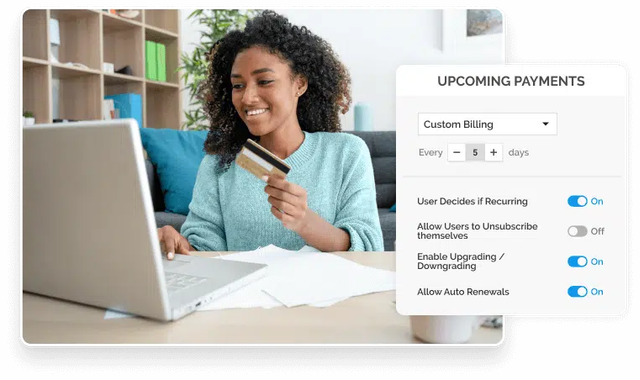
- Automated Payment Plans: Set up recurring billing and flexible payment schedules.
- Integrated Registration and Billing: Manage your registration forms and payments in one easy-to-use software system.
- Real-Time Tracking: Monitor payments, overdue bills, and account balances.
- Secure Payment Processing: Accept payments through credit cards, debit cards, and other methods using a secure website.
- Custom Invoices: Tailor invoices to include client contact information, due dates, and payment terms.
Switching to an electronic billing system is one of the smartest decisions your organization can make. Regpack offers the ideal solution with features that simplify your billing process, reduce administrative work, and provide a better experience for your participants or clients.