
Are you looking to automate school processes like student registration and payment collection?
Then it's time to find the right student registration software platform, one that helps you achieve process optimization.
In this article, we'll explore nine popular registration tools and highlight their pros and cons, key features, and pricing so you can find the right one for your business's needs.
Already sure you need a dedicated platform? See our course registration software built for schools and class-based programs.
Regpack
Regpack, an online student registration and payment software, takes care of the heavy lifting for educational program directors, teachers, and admin staff.
Educators and admins save hours of manual work and data collection with custom forms, workflows, and attendance rosters built into a single, robust platform.
Source: Regpack
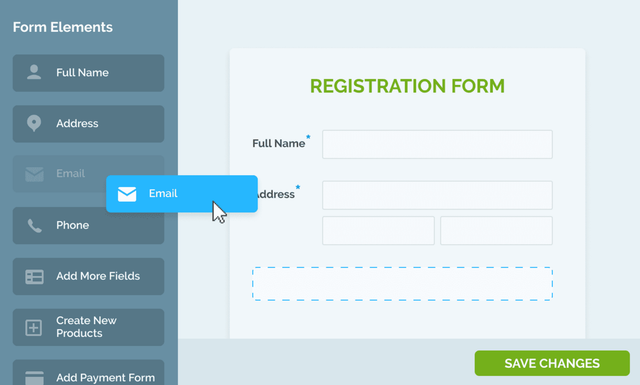
Students register on your website through embedded custom forms, making it easy for students or parents to sign up and pay. Your custom registration flow runs on automation and conditional logic, adapting registration routing based on student answers.
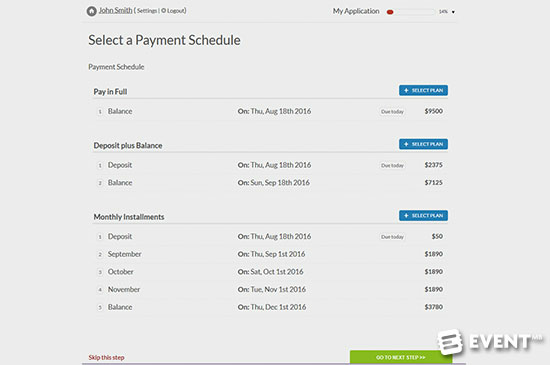
Regpack also allows you to provide your customers with flexible payment options, from recurring billing to custom payment plans.
For example, the users below offer their customers three different payment schedules:
Source: Regpack
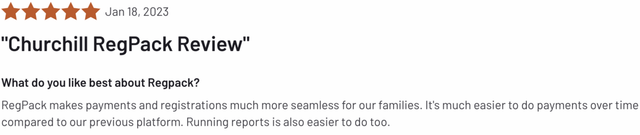
Regpack offers a variety of payment options for your program and students. Methods include: ACH bank transfers, credit cards, debit cards, Apple Pay, PayPal, and e-wallet methods.
Students or families can pay in installments or in full — the decision is up to each program director.
Source: G2
Regpack's pricing is tiered by organization size on annual plans, with payment processing as low as 1.5% per transaction - book a demo for an exact quote
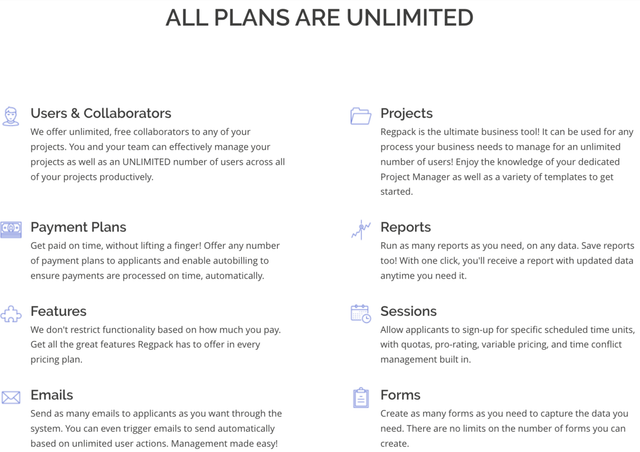
Unlike many comparable tools, this package comes with unlimited team use, unlimited projects, and unlimited users, and more.
Source: Regpack
Overall, Regpack is a registration and payment platform built for after-school programs, camps, schools, and other educational programs seeking registration, payments, reporting, and management in one platform.
See your numbers
Get a personalized, no-commitment savings report.
Have a question?
Ask Regpack AI anything.
Alma
Alma is a K-12 student information system (SIS) that offers a wide variety of features, from bus route, incident, and attendance tracking all the way to communication tools and a registration form builder:
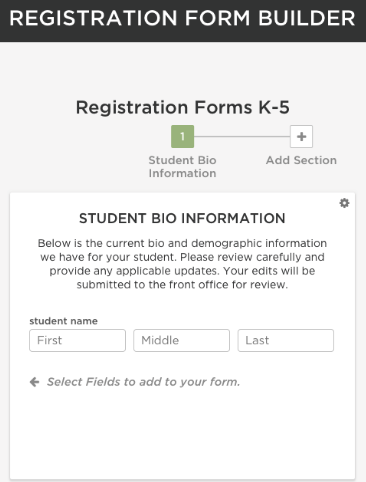
Source: Alma
Its range of features makes it a great all-in-one solution for a school, providing support for both administrators and teachers.
Since it powers almost every aspect of running a school, it can help you tremendously reduce paper costs and improve efficiency.
However, if you're just looking for a point solution with essential student registration features, such as online registration and automated billing, this tool might have too broad a feature set for your school or program.
One of the major selling points of Alma is its comprehensive, easy-to-use reporting functionality.
Users can quickly create reports that enlighten them about various aspects of their school, such as student attendance, grade averages, or missing assignments.
A con is that the company doesn't list pricing on its website, so you’ll need to sign up for a web demo to get a personalized quote.
Classter
Classter offers an online enrollment management software solution that helps you streamline all the processes involved in enrolling new students, including registration, admissions, application tracking, and online billing.
The software enables parents and students to self-register for classes and programs through online forms that you create on the platform:
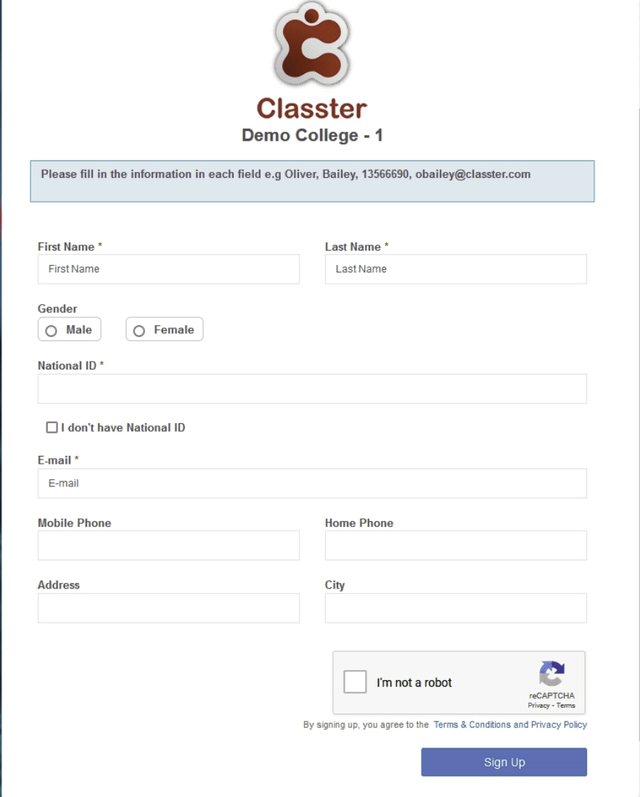
Source: Classter
If there are fees associated with your registration, you can pay them through the online form, and Classter will process the transactions securely.
In the administrator’s admissions portal, your team will be able to track and manage applications and other important documents throughout their life cycles.
A great feature for applicants is the student admissions portal, where they can track their application status, view announcements and messages, and apply to other programs at your school.
One downside is the mobile app, as it doesn't allow you to use much of the functionality available on the desktop platform.
The company offers customized pricing, but allows you to get a pricing estimate without speaking to a representative, through their pricing calculator:

Source: Classter
For registration management at a primary school with 250-500 students, the price was 4 euros per student per year for Classter Core.
Corsizio
Corsizio is a student registration software that helps educational programs manage events and classes, offer online registrations to their students, and collect online payments.
Their form builder lets you create clean forms with pre-built and custom fields, capturing the details you need to run your school effectively.
Other useful registration features include waiting lists, real-time updates on new registrations, and integration with Google Analytics to track the performance of your online forms and event pages.
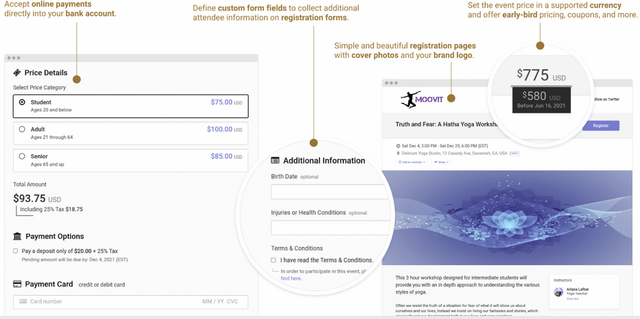
Source: Corsizio
The tool enables you to provide your customers with a seamless experience.
Potential students can quickly register on their laptops or mobile devices without entering a password.
Registrants can also make payments through the form using various methods, and these payments are automatically transferred into your business's bank account, thanks to Corsizio's integration with Stripe.
For companies accepting fewer than 50 registrations per month, there's a free version of the platform.
Above that, the company offers usage-based pricing. You'll pay 10 cents for every new registration, with no penalty for low registration numbers.
If you're looking to accept online payments, the cost is one dollar per transaction.
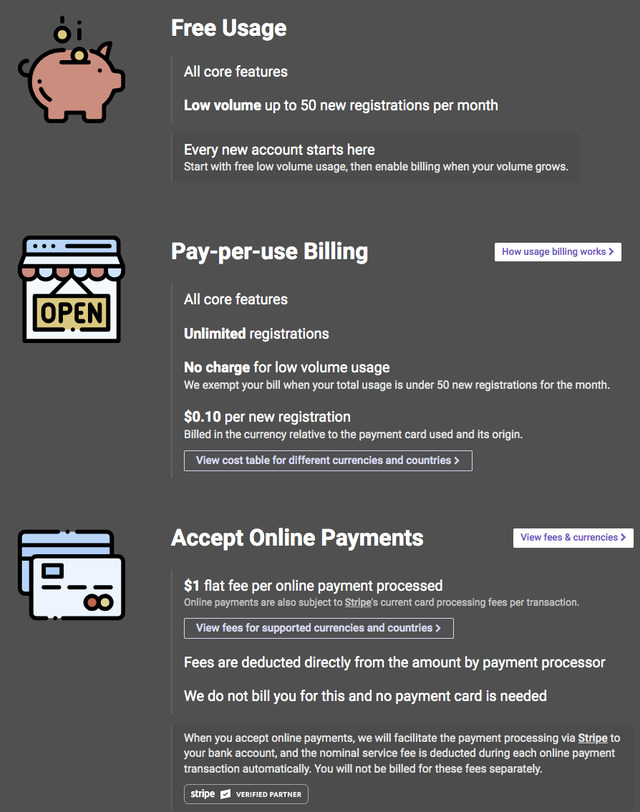
Source: Corsizio
Because of its free option, this is a great platform for companies in the early growth stages, offering classes, events, seminars, and training sessions that they post publicly.
However, the platform lacks a private student portal feature, a place where attendees or students can view upcoming events and manage their registrations, payment plans, and scheduling, and that constitutes a major flaw.
CourseStorm
CourseStorm is an online student registration software platform that is simple to use for both your staff and your students.
Their primary customers are arts organizations, community education programs, workforce training and continuing education companies, and kids' activities and camps.
Through the platform, users can quickly build custom registration forms to host on their websites, where students can register for classes and programs and make secure payments from the comfort of their homes.
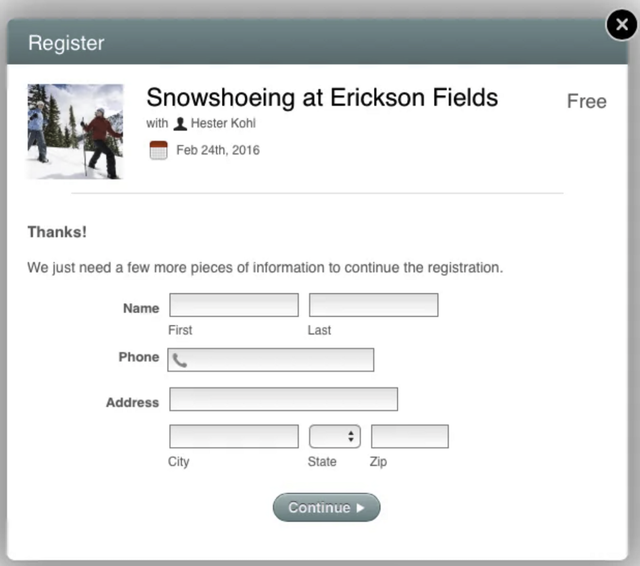
Source: CourseStorm
CourseStorm also offers mobile registrations, group registrations (where one person signs up many people), and email marketing features, such as automated course recommendations.
This feature automatically emails your students personalized class recommendations based on their registration history.
The software also enables you to create payment plans that you can offer to your students, thereby making payment less of a stressor for them.
Another nifty feature is waiting lists, which will automatically close registration once a course program reaches maximum capacity.
A major downside is that the software's page customization options are somewhat limited, which might be frustrating for people who care deeply about controlling the look and feel of their website and forms.
As for pricing, they charge a 4% registration fee and a 3% credit card processing fee, meaning that you only pay for what you use.
Enrollsy
Enrollsy is online enrollment software with registration and online payment features for businesses looking to enroll vendors, students, volunteers, or employees.
Their registration has customizable forms, and the platform offers features that improve the registration experience for your customers, such as field validation, multiple enrollments at once, and automated email confirmation.
Enrollsy comes with a suite of e-signature features to help you streamline the process of signing and managing documents, such as non-disclosure agreements with employees and field trip permission forms with your students’ parents.
Enrolls has a built-in CRM, secure auto-payments, and reporting functionality that enables you to analyze your enrollment management process and identify ways to improve it.
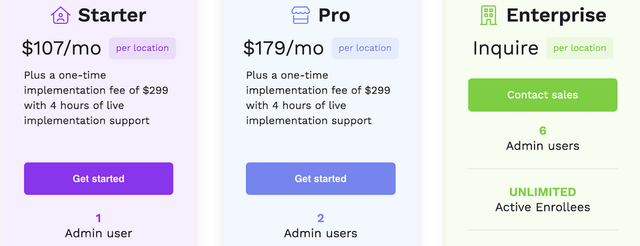
Pricing starts at $107 per month per location, plus a one-time charge of $299 for software implementation.
Source: Enrollsy
The Starter plan allows access to only one admin user. To add a second, you'll have to upgrade to the Pro plan.
Jumbula
Jumbula provides an online registration and management system that enables your customers to find, register for, and pay for courses, camps, and other activities.
You can build custom online registration and payment forms using the platform's setup wizard.
And via these online forms, you'll be able to accept a wide range of payment methods from your students, including ACH transfers, credit cards, and PayPal.
Jumbula also offers waitlist and real-time capacity management tools, automated confirmation emails, and a check-in/check-out live attendance tracking feature:
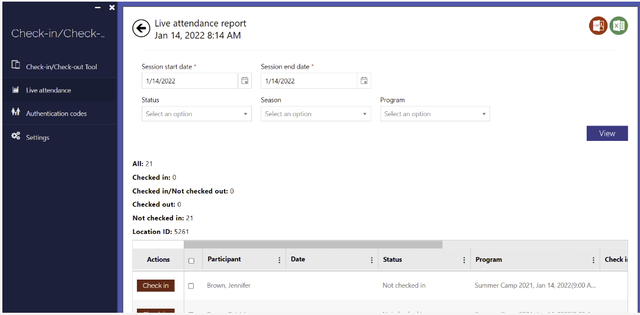
Source: Jumbula
Jumbula provide in-depth, prebuilt reports to gain insights into revenue, balances, student attendance, class setup, medical information, and more.
Pricing begins at $100 for the Professional plan, which includes many essential features for student registration and payment collection and is best suited for small- to mid-sized businesses.
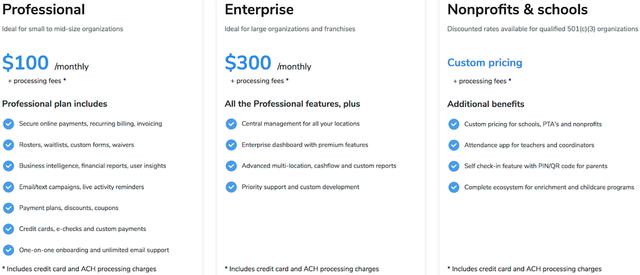
Source: Jumbula
Although it's a robust piece of software, some users might find the learning curve to be a little steep.
There are various steps involved in setting up different programs on the site, with manual steps noted.
That said, many customers say that the support staff is quick to respond and that the video tutorials are helpful when they're stuck.
Learning Stream
Learning Stream is a registration management platform built for educational and training professionals.
It serves those who need to streamline their student registrations and automate much of the work involved.
The platform comes with form building, group registrations, online payment processing, texting, custom payment plans, and other useful features for administrators and teachers.
One standout feature is the student portal, where students can find course information and sign up without needing assistance from a staff member.
They'll also receive notifications about class cancellations and updates about new class offerings. This helps them stay in the loop while reducing your team's workload.
Although the tool has many great features, some people find the user experience a bit complicated, especially when setting up customizations.
As for pricing, Learning Stream uses flat fee pricing and allows unlimited registrations.
Plans start at $450 per month, and each additional admin user costs an extra $60 per month. There is also a one-time setup fee.
Overall, Learning Stream is a solid piece of software for managing your student registrations online, provided that you can afford the relatively steep starting price.
Sawyer
Sawyer is a registration management tool designed for children's activity businesses like camps, music lessons, or after-school programs,
With Sawyer, you can offer online registrations and bookings, process online payments securely and automatically, take and track attendance, and much more.
The tool also allows you to offer parents a variety of payment plans and methods, making it easier for them to pay.
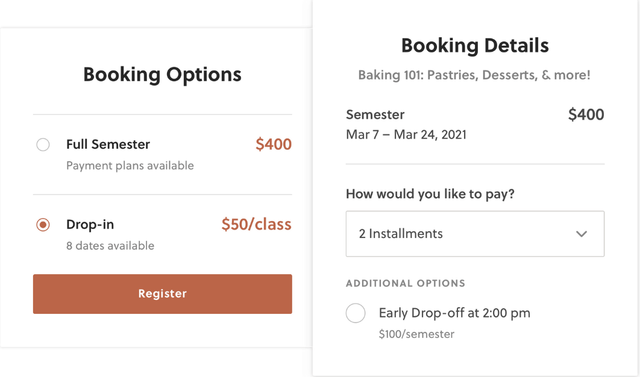
Source: Sawyer
The software comes with custom reports that help identify key performance metrics and spot bottlenecks in your registration or enrollment process.
Pricing starts at $109 per month (billed annually), plus processing fees, for their Launch Plan, a package meant for smaller teams.
Below are the other pricing tiers:
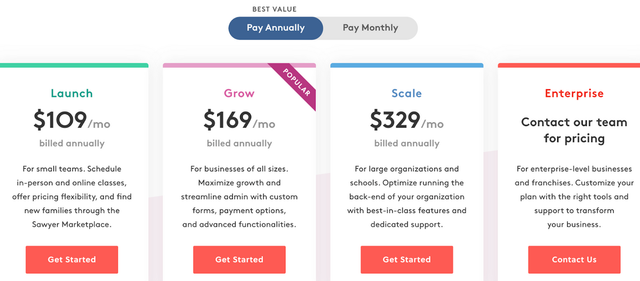
Source: Sawyer
One flaw with the Launch plan is that it only allows you to use their pre-designed registration forms. You can't customize them unless you upgrade to Grow.
The Launch plan also restricts access to the auto-billing and waitlist features.
Conclusion
When choosing an online student registration solution, it's critical that you first create a list of must-have features and set a budget.
Then, start looking for tools that meet those criteria and are specifically designed for businesses like yours.
Don't hesitate to hop on the phone with a company representative and ask a few questions to determine if it's a good fit.
Software websites can be a bit vague about their offerings, so talking with a product expert or attending a demo is often the fastest way to get a feel for the solution’s abilities and ROI.
If you want to learn some other ways aside from adopting technology to lower costs and attract more students, check out our article on nine ways to improve student enrollment.
Looking for a dedicated platform? See Regpack's student registration software for courses, classes, and programs.