Child Check-In and Pickup Software

Child Attendance Tracking Software With Safe, Approved Pickup

Child check-in and pickup software that checks every adult at the door against the list each family approved, and records who took each child home.

6,000+ Organizations Served $1B+ Processed Annually 96% Registrant Satisfaction 30% Increased Revenue
Quick answer

What is child attendance tracking software?

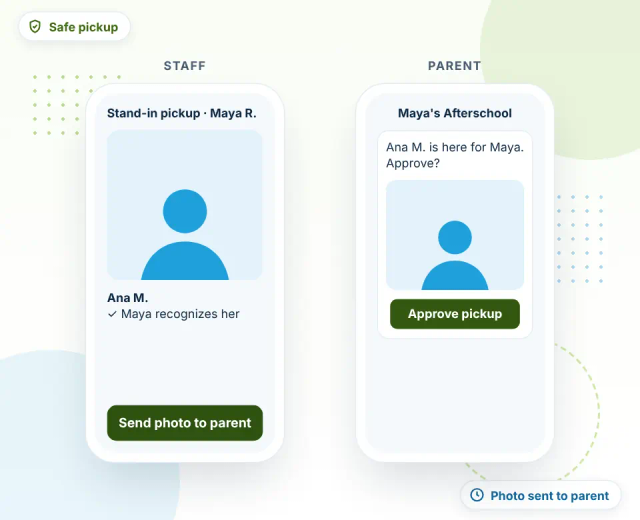
Child attendance tracking software records when each child arrives and leaves, checks the adult at pickup against a family-approved list, and sends photos to parents when a stand-in does pickup. and maintains a live roster of who is on site. Regpack connects it to registration and payments, so the roster and pickup list stay current without re-entry.

Authorized pickup

How does authorized pickup work in child attendance tracking?

1

An adult arrives

Staff pull up the child's profile at the door before an adult has access.

2

Checked against the list

Only adults the family approves are able to pick-up and leave with the child.

3

Stand-in process

Parents must approve any stand-in adult for pick-up; the child must recognize the adult; and a picture must be sent to the parents.

4

Roster updates

Child pick-up time automatically updates the child's profile and roster.

5

Full check-out

Once approved and checked out, the child and adult leave smoothly.

6

Time saved

The process focuses on ensuring children are safe and that parents don't spend 20 minutes in a pick-up line waiting to sign a sheet of paper.

When something's off

What happens if an adult isn't on a child's pickup list?

Regpack flags the adult before the child is released, so staff stop and verify at multiple checkpoints.

  • Flag when an adult isn't approved
  • Approved list visible to every staff member
  • Every pickup attempt on the child's record
Pickup safety features

What pickup safety features should child attendance software have?

Every tool is built around one job: making sure each child leaves with an adult their family approved.

Approved pickup lists

Families name the adults allowed to pick up, stored on each child's profile.

Flag for unapproved adults

Staff are alerted before a child is released to someone not on the list.

Signature at check-out

A signed record of who took each child home.

Live roster

See who's on site from any phone or tablet for headcounts and drills.

Exact drop-off and pickup times

Every arrival and departure stamped, with no rounding.

Full pickup history

Look up who picked up any child on any day and export it.

Child Attendance Tracking Software FAQ

How does authorized pickup work? +
Families name the adults allowed to pick up their child, and that list is stored on the child's profile. At pickup, staff check the adult against the list, capture a signature, and release the child. Regpack flags anyone who isn't on the list so staff stop and verify first.
Who can change a child's pickup list? +
The family sets the approved pickup list, and your staff can see it at the door. Confirm with your program how families should request changes so the list stays accurate.
Can I see who picked a child up on a past day? +
Yes. Every pickup is saved with the adult, the time, and a signature on the child's record, and you can export attendance by child or date range to Excel or PDF.

See approved pickup in a demo